Industrial 3D animation: turning CAD models into sales and training videos
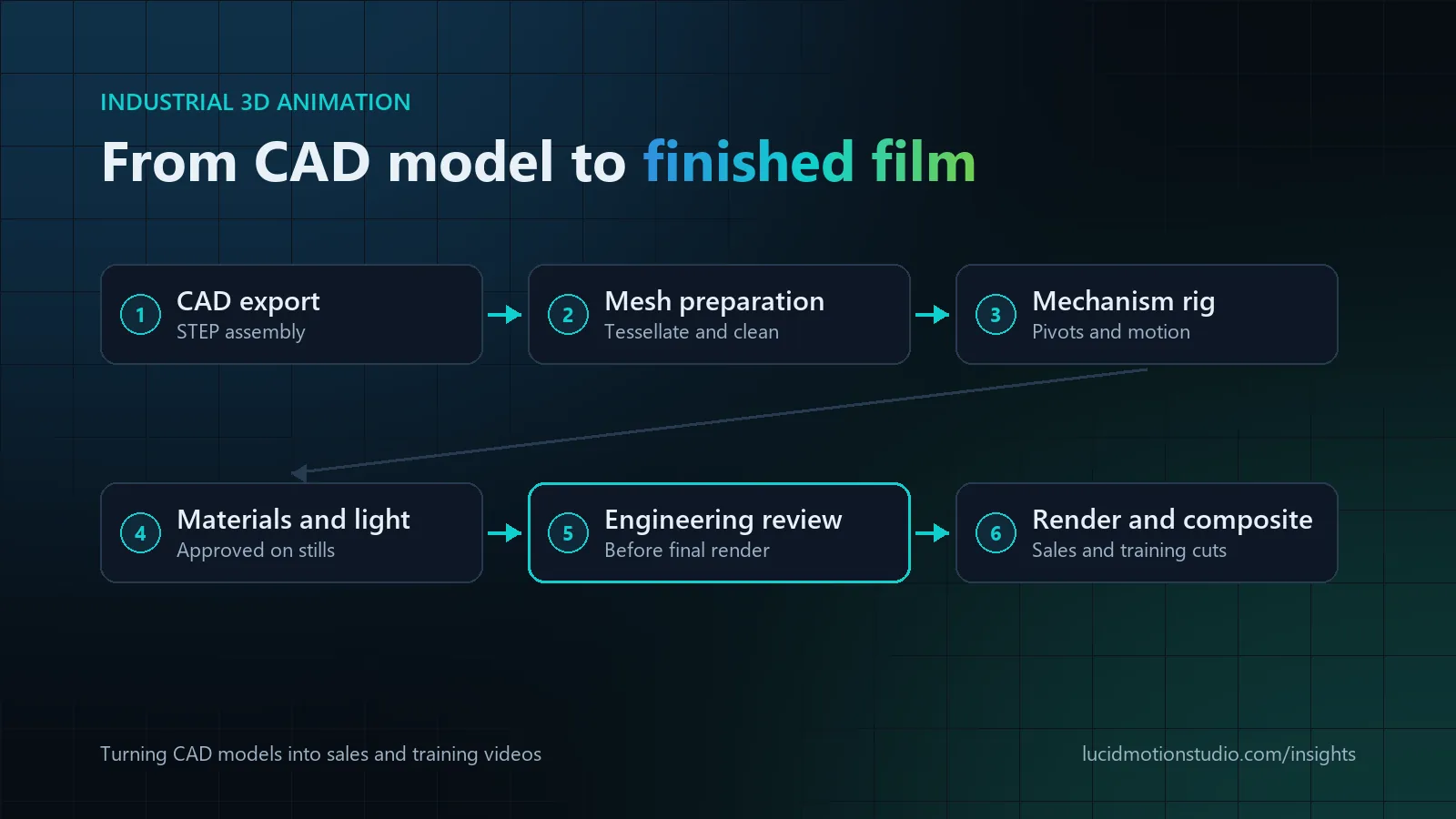
Industrial 3D animation turns engineering data, usually CAD, into rendered video that shows how a machine or product is built, installed, operated or maintained. Existing CAD speeds production, especially for internal mechanisms and assembly sequences, but it is not ready to animate as exported: precise CAD surfaces must be converted into optimised polygon meshes, simplified, given materials and rigged to move, and your engineers should check the result before final rendering. For marketing shots of an exterior, cleaning or remodelling the visible surfaces is often faster.
Key facts
- CAD helps most with internal mechanisms, exploded views and assembly sequences
- CAD is not animation-ready. It needs tessellation, clean-up, materials and a working mechanism rig
- Send a STEP export of the full assembly with its hierarchy, plus units, motion data and reference photos
- Cables, hoses, labels and textures are often missing from CAD and are usually added by the studio
- Engineering review comes before rendering, because changes after the final render cost the most
- Timeline: detailed 3D at Lucid Motion Studio usually takes four to eight weeks
What industrial 3D animation is used for
| Video type | Typical audience | What CAD contributes |
|---|---|---|
| Exploded views | Specifiers, engineers, procurement | The real part hierarchy and how components fit together |
| Assembly sequences | Installers, distributors, production staff | Correct order, orientation and fasteners |
| Internal mechanisms and cutaways | Technical buyers, trainees | Accurate moving parts behind the casing |
| Installation demonstrations | Customers, field technicians | Dimensions, clearances and mounting points |
| Maintenance and safety training | Operators, maintenance teams | Access points, guards and the components to service |
| Manufacturing process explainers | Sales teams, investors, new employees | Machine layout and the path of material through a line |
| Sales and trade-show films | Buyers, distributors | Hero shots of a product that may not have shipped yet |
One model often serves several of these, which is where much of the value of an industrial animation project lies. The product-marketing side of 3D, such as hero films and e-commerce renders, is covered on our 3D animation page. This guide is about the engineering data behind industrial work and what happens to it in production.
Can an animation studio work with your existing CAD models?
Usually, yes. Studios that do technical work generally accept neutral CAD exports such as STEP or IGES, as well as mesh formats such as OBJ and FBX, and some can open native files from particular CAD packages. A STEP export of the assembly is the safest default, because it preserves the part structure without the studio needing your CAD software. Lucid Motion Studio works from STEP, OBJ, FBX and similar files, and builds models from drawings, photos or samples when no CAD exists.
What to export and send
- The assembly, not loose parts, with the hierarchy intact and parts named so someone outside your team can follow them.
- The units used, and which way is up.
- A note of which parts move, how (rotation or sliding), through what range and at what speed, or a short phone video of the real machine running.
- Finish and colour specifications, such as RAL or Pantone references, surface finishes, logos and labels.
- Reference photos of the real product, especially cables, hoses, labels and textured surfaces.
- A list of anything that must not be shown, such as proprietary internals.
Protecting confidential engineering data
You rarely need to send the whole design. Suppress or simplify internal components the video will not show, and leave out supplier parts you are not entitled to share. For unreleased products, agree confidentiality before files change hands. We are happy to work under your NDA when confidentiality is required, and CAD files you share are used only for your project.
Preparing CAD for animation: the step most quotes underestimate
CAD and animation software describe geometry differently. CAD systems store precise mathematical surfaces designed for manufacturing; animation and rendering tools work with polygon meshes. Getting from one to the other takes several steps, and their size depends on the files.
Tessellation: from precise surfaces to polygons
Converting CAD surfaces into a mesh is called tessellation. Too coarse, and curved surfaces look faceted in close-ups. Too fine, and a single bolt can carry more polygons than it will ever need on screen, which makes scenes slow to animate and render. Good preparation sets the density part by part: high for the surfaces the camera approaches, low for parts only seen from a distance.
Clean-up and optimisation
Engineering assemblies carry detail no viewer will see: internal threads, hidden fasteners, duplicated parts and tiny features. Preparation removes or merges what the camera never shows, repairs surfaces that convert badly and reorganises the hierarchy for animation. A full machine assembly can contain thousands of parts, of which a sales film may need only a fraction.
Setting up the mechanism
To move correctly, parts need pivots on their real axes and links between them: gears turning at the right ratio, a piston connected to its crank, a door that stops at its hinge limit. Motion data from your engineers, or a recording of the real machine, keeps this accurate.
When CAD speeds production up, and when remodelling is faster
| Situation | Usual approach |
|---|---|
| Complete, current CAD, and the internal mechanism is the story | Use the CAD. It is the fastest route to accurate motion |
| Exploded views or assembly sequences | Use the CAD, prepared and simplified |
| Marketing shots where only the exterior is seen | Often faster to clean or remodel the visible surfaces for render quality |
| CAD is outdated, partial or missing supplier components | Use what is accurate and remodel the gaps from drawings and photos |
| Flexible parts such as cables, hoses, belts, seals and labels | Usually added or remodelled, since CAD often simplifies or omits them |
| Cast, knurled or textured surfaces | Created in the materials rather than in the geometry |
| No CAD at all | Model from drawings, photos and measurements, or consider 2D or motion graphics |
This decision belongs to the technical review at the start of the project. A studio that quotes without looking at your files is guessing how much preparation they need.
Materials, lighting and camera direction
CAD rarely carries render-ready materials. Brushed steel, powder coat, anodised aluminium, cast iron, rubber and moulded plastics each need their own surface treatment, along with decals, warning labels and logos. Materials and lighting should be approved on still frames before animation begins, because changing them after the final render means rendering again.
Camera direction depends on the audience. Engineers want views that match the drawings and keep orientation clear; marketing audiences respond to slower, closer and more dramatic moves. In both cases the camera should move only when the viewer needs a new view, and each mechanism should play slowly enough to follow.
Technical verification: who checks what, and when
Accuracy problems are cheapest to fix before rendering. A practical sequence:
- Model review. Your engineer confirms the part revision, orientation and any simplifications.
- Motion review. A low-detail preview of the animation, without final materials or lighting, is checked for direction of rotation, sequence, clearances and speeds.
- Look review. Still frames confirm materials, colours and branding.
- Final review of the rendered and composited film, including labels, units and callouts.
Training and safety content needs extra care. Guards, interlocks and personal protective equipment must appear as they would in real operation, and maintenance steps must follow your documented procedure. Your health and safety or training team owns that content and its sign-off. Animation can show a procedure clearly, but it does not certify that a video meets a regulatory or training standard.
For machinery sold in the EU, note that the Machinery Regulation (EU) 2023/1230 applies from 20 January 2027, and the European Commission notes that it clarifies the conditions under which instructions for use can be provided in digital format. Video can support those instructions, but whether and how it forms part of your required documentation is a decision for your compliance team.
Rendering and compositing
Rendering turns the scene into finished frames, and its cost grows with every frame. A 60-second film at 30 frames per second is 1,800 frames, and a 4K frame has four times the pixels of a Full HD one. Reflective metals, glass, transparent cutaways and depth of field all add render time. That is why changes after the final render cost more than changes to a preview, and why the approval gates come first.
Compositing then combines the rendered passes with labels, callouts, dimension lines, motion graphics and colour grading. Keeping text in compositing rather than inside the 3D render makes language versions and later edits much cheaper.
One model, many deliverables
- A narrated sales film for the website and sales meetings.
- A silent loop for trade-show screens.
- Short training modules for installation, operation and maintenance.
- High-resolution still renders and transparent-background images for catalogues and the web.
- 9:16 and 1:1 versions for social, plus subtitle or voiceover language versions.
To reuse the model later, agree at the start that the prepared model and scene files are kept, and whether you receive them.
Timeline and budget drivers
Detailed 3D work at Lucid Motion Studio usually takes four to eight weeks, depending on model complexity, length and finish. The main cost drivers are:
- The condition of the CAD, and how much preparation or remodelling it needs.
- The number of shots and the length of the film.
- Realism: photorealistic materials take more look development than stylised ones.
- Mechanisms and simulation, such as fluids, particles or flexible parts.
- The number of deliverables and versions.
- Changes requested after rendering.
Market price ranges and how a 3D quote is built are covered in how much 3D product animation costs.
Briefing checklist for an industrial animation project
- Purpose: sales, training, installation, trade show or investor communication.
- The audience and their technical level.
- The one mechanism or process the viewer must understand.
- CAD files of the current revision, or drawings and photos.
- Motion data or a video of the real machine.
- Materials, colours, logos and labels.
- Anything that must not be shown.
- Who reviews engineering accuracy, and who reviews safety content.
- Deliverables, versions and languages.
- The deadline, such as a trade show or launch date.
Industrial 3D animation at Lucid Motion Studio
We build industrial and technical animation from CAD, drawings, photos or samples, approve materials and lighting on still frames before animation, and deliver for the web, sales, trade shows and training. A 3D model helps but is never required to start. See 3D animation for formats and deliverables, manufacturing and industrial video for related work, and training videos for procedure and safety modules.
Sources
Related reading
Common questions
Do we need CAD files to make an industrial 3D animation?
Which CAD file format should we send?
How is our CAD data kept confidential?
Can the same 3D model be reused for training videos later?
Have CAD files and a product to explain? Let’s look at them.
Send a STEP export or drawings, a few photos and a sentence on what the video must show. We will tell you what the files can do, what needs remodelling, and send a fixed-price quote in writing within 24 hours.