SaaS product launch video strategy: what to create before, during and after launch
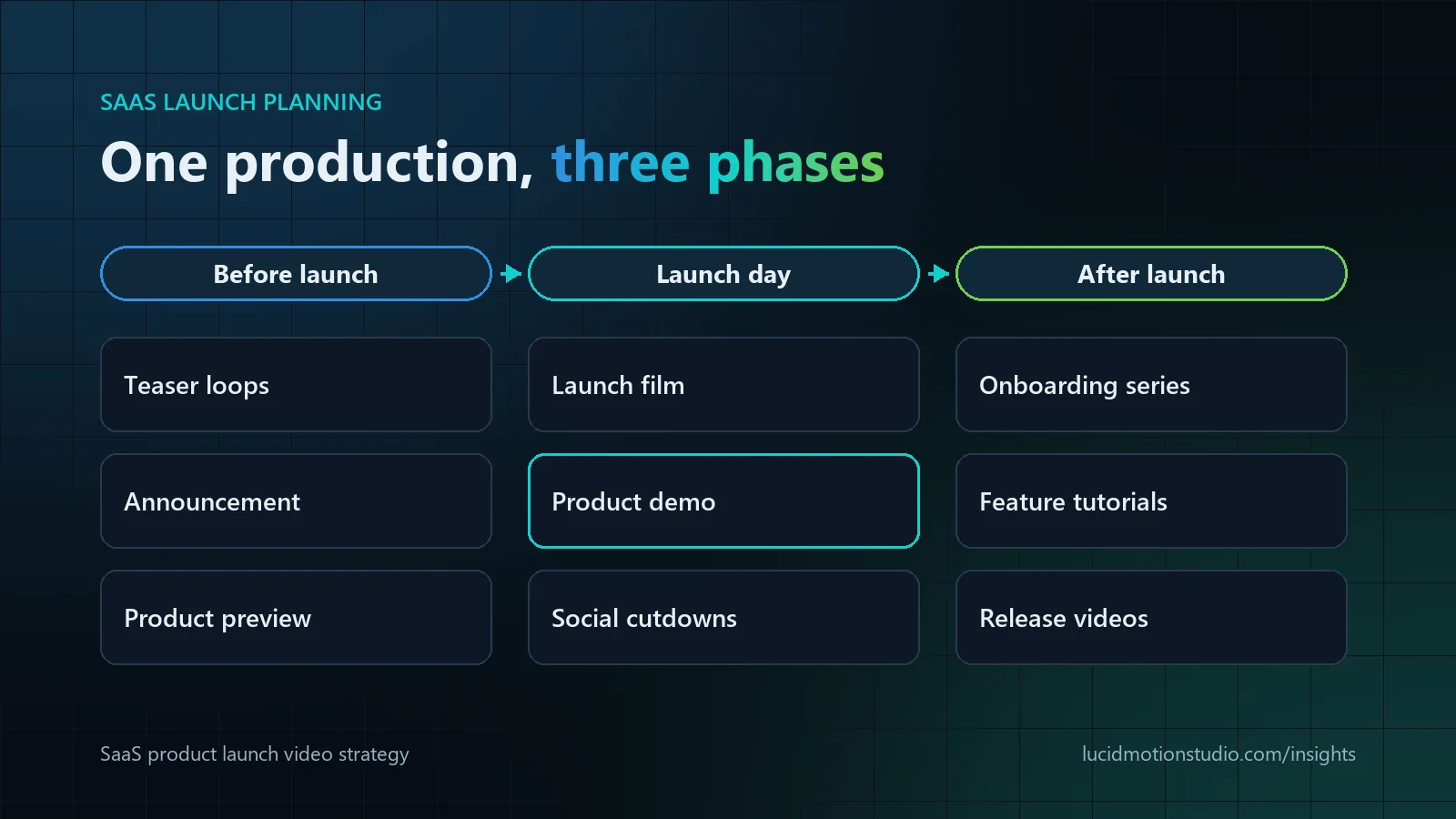
A SaaS launch needs a sequence of videos rather than one launch video. Before launch, short teasers and a product preview built from recreated UI create interest without exposing unfinished screens. On launch day, a 60 to 90 second launch film or explainer, a one to three minute product demo and captioned social cutdowns carry the announcement. After launch, onboarding, feature tutorials and update videos turn sign-ups into active users. Plan all three phases as one production so every asset shares the same script research, design system and screens.
Key facts
- Before launch: teasers of 6 to 15 seconds and a 30 to 60 second preview, built from recreated UI
- Launch day: a 60 to 90 second launch film or explainer, a 1 to 3 minute demo and captioned cutdowns
- After launch: onboarding series, feature tutorials and 20 to 60 second release videos
- Screen recording or animated UI is decided shot by shot, not once for the whole project
- Budget order: the most-seen asset, then the demo, then cutdowns, then onboarding, then teasers
- Lucid Motion Studio: a typical 60-second SaaS video takes two to four weeks; packages from $180
Why a SaaS launch needs a video plan, not a launch video
Most launch budgets go into one hero film that plays for a week. The videos that do most of the work after launch day, such as the demo a sales rep sends, the onboarding clip that gets a trial user to a first result and the feature video in the release email, are often made later, in a hurry and in a different style.
Planning the three phases as one production changes that. The same discovery, script research, design system, recreated screens and voice can produce teasers before launch, the launch film and demo on the day, and education content afterwards. Each asset costs less because the expensive decisions are made once.
This guide is about sequencing. If you are choosing between formats for a single placement, start with SaaS explainer vs product demo vs UI animation. For the structure of the demo itself, see how to script a SaaS demo.
The SaaS launch video map at a glance
| Phase | Video | Typical length | Where it runs | Main job |
|---|---|---|---|---|
| Before launch | Teaser loop | 6 to 15 seconds | Social, waitlist page | Create curiosity about the problem |
| Before launch | Announcement | 30 to 45 seconds | Social, email, partner channels | Say what is coming and when |
| Before launch | Product preview | 30 to 60 seconds | Waitlist emails, investor and partner updates | Show one real moment of the product |
| Launch day | Launch film | 60 to 90 seconds | Launch post, homepage, press kit | Announce with energy and one clear claim |
| Launch day | Explainer | 60 to 90 seconds | Homepage, paid ads | Explain problem and solution to newcomers |
| Launch day | Product demo | 1 to 3 minutes | Product and pricing pages, sales follow-up | Prove the workflow works |
| Launch day | Social cutdowns | 6 to 30 seconds | Paid and organic social | Carry one idea each, with the sound off |
| After launch | Onboarding series | 1 to 3 minutes each | In-app, welcome emails | Get new users to a first result |
| After launch | Feature tutorials | 1 to 3 minutes | Help centre, academy | Answer "how do I...?" questions |
| After launch | Release videos | 20 to 60 seconds | Release notes, email, social | Make each improvement visible |
Lengths are starting points, not rules. For a small launch, the launch film and the explainer can be one video, as long as you accept the trade-off described below.
Before launch: build anticipation without giving the product away
Teasers and announcements
Teasers work best when they show the problem, not the product. A short loop of the frustration your software removes, such as the spreadsheet with forty tabs, the alert storm or the approval chain that never ends, earns attention without exposing unfinished screens. The announcement then adds the name, the date and one sentence of value.
Product previews when the interface is not final
Pre-launch video almost always runs into the same problem: the interface is still changing. Recreated, animated UI solves it. Screens are rebuilt from design files, so they can be updated when the product changes, filled with clean sample data and simplified to the elements that matter. Screen recordings of a staging build tend to date quickly and often show test data.
Keep the preview to one real moment, the result the user gets rather than a tour. It is the most concrete promise you can make before launch, and it reuses scenes from the demo you will need anyway.
What to lock before production starts
- The product name, the positioning statement and the one claim the launch rests on.
- A UI freeze date for the screens the videos show, agreed with product and design.
- A sample data set: realistic company names, figures and users, with nothing confidential in it.
- Which features are in scope at launch, and which must not appear because they sit behind a feature flag.
- One person who can answer product questions and approve screens.
Launch day: the reveal, the explanation and the proof
Launch film or explainer?
A launch film is news. It has more energy, focuses on what is new and why now, and is built for the announcement post and the first weeks of traffic. An explainer is evergreen. It starts from the viewer's problem, assumes no knowledge of your company and can stay on the homepage for a year or more. One video asked to do both jobs usually dates within weeks or never feels like news.
If the budget forces a choice, produce the explainer and cut a launch version from it with a different opening and end card. Stretching a launch film into an evergreen explainer rarely works as well.
The product demo
The demo is where prospects decide whether your software does their job. Follow one realistic task from start to finish in one to three minutes instead of touring the menus. The demo also becomes the source of most post-launch assets, so build it in modular scenes from the start.
Social and sales assets
Cut the launch film and demo into short clips that each carry one idea, and design them to work with the sound off. Browsers such as Chrome always allow muted autoplay but restrict autoplay with sound until the user has interacted with the site, so embedded and in-feed video often starts silent. Burned-in captions or on-screen text are therefore part of the edit, not an extra. Deliver 9:16 and 1:1 versions alongside 16:9 from the same project, and give sales a 30 to 60 second cut that answers their most common objection.
After launch: the videos that keep customers
A launch creates sign-ups; education turns them into users. Post-launch video usually has a longer life than the launch film itself:
- Onboarding series. Three to five short videos covering set-up, the first key action and what to do next, placed in-app and in welcome emails.
- Feature tutorials. One video for each common "how do I...?" question, for the help centre, so the same questions stop reaching support.
- Release videos. 20 to 60 seconds for each significant release, in the launch style, so the product visibly keeps improving.
- UI loops. Narration-free clips of single interactions for feature pages, documentation and release notes.
Because these reuse the launch design system and recreated screens, each one costs a fraction of the original production. That is the main argument for planning them before launch rather than after.
Screen recording or animated UI?
The choice is made shot by shot, and most launch videos use both.
| Use enhanced screen recording when | Use recreated, animated UI when |
|---|---|
| The interface is stable, clean and readable at video size | The UI will change before or soon after launch |
| Technical buyers expect to see the real product | Screens are dense or show data that must stay private |
| Speed matters more than polish, as with weekly updates | The value happens behind the interface: integrations, automation, AI decisions |
| The workflow is short and linear | The same scene is needed in several aspect ratios or languages |
Keeping the UI accurate
Accuracy is decided at storyboard stage. Someone on the product team should check every screen in the storyboard against the build that will ship, including labels, icons, plan names and any figures on screen. Recreated UI may simplify but must not invent: removing clutter is fine, showing a feature the product does not have is not. When the product changes after launch, modular scenes mean one section is updated rather than the whole video remade.
Where to spend a SaaS launch video budget first
- The asset prospects see most. For most B2B launches that is the homepage explainer or the launch film.
- The demo. It does the convincing, and it supplies screens for almost everything else.
- Cutdowns of those two. Inexpensive once the masters exist, provided they were planned from the start.
- Onboarding, especially for product-led growth, where activation matters more than awareness.
- Teasers, if time and budget remain. They are the easiest item to drop.
As a reference for planning: at Lucid Motion Studio a typical 60-second SaaS video takes two to four weeks from brief to delivery, and fixed-price packages start from $180 for a 30-second video and $340 for a 60 to 90 second explainer. Launch sets and series are quoted individually, and teams that release continuously are often better served by a monthly subscription than by per-project quotes. Work backwards from launch day and leave review time for your product team.
How to repurpose one launch production
- Create a design system first (type, colour, UI treatment, icon style) so later videos match without new design work.
- Recreate key screens once as reusable components rather than separately for each scene.
- Record the voiceover in short, separate lines so sections can be replaced when the product changes.
- Keep text on separate layers so language versions do not require rebuilding scenes. Our guide to multilingual video production covers the details.
- Export UI loops and still frames from the demo for feature pages, emails and sales decks.
Example: a launch video plan for a fictional SaaS company
Illustrative example, not a client project. A fictional 40-person company sells accounts-payable software to mid-sized finance teams and is launching an AI feature that matches invoices to purchase orders. Its buyers are finance managers who know the problem well but distrust automation they cannot check.
| When | What is produced | Why |
|---|---|---|
| 8 weeks before launch | Discovery from a live demo; explainer and demo scripts written together | One message across both videos |
| 6 weeks before | Storyboard and UI plan approved; screens recreated from design files with sample invoices | The interface is still changing |
| 3 weeks before | Two 10-second teaser loops of an overflowing approval queue | Show the problem, not the product |
| Launch day | A 75-second explainer with a launch-specific opening; a 2-minute demo following one invoice from upload to approval; six captioned social cutdowns | Reveal, explanation and proof |
| First month | Three onboarding videos and four UI loops cut from demo scenes; a 45-second sales cut showing how a person reviews and overrides a match | Activation and trust |
The sales cut is the detail worth copying. For this audience the likely objection is control, so a short video showing a person checking and correcting the AI's work addresses the question most likely to stall a deal. Decisions like this come from understanding the buyer, which is why discovery happens before the script.
Planning a SaaS launch with Lucid Motion Studio
We produce launch films, explainers, demos, onboarding series and release videos built around your real interface, and your product team checks every screen at storyboard stage. See SaaS video production for formats and deliverables, the software, SaaS and AI industry page for related work, and Our Work for published SaaS films. For pre-release products, we are happy to work under your NDA when confidentiality is required.
Sources
Related reading
Common questions
How long should a SaaS product launch video be?
When should we start producing launch videos?
Can you make a launch video before the product UI is finished?
Should we use AI-generated video for a SaaS launch?
Planning a SaaS launch? Let’s map the videos.
Share your launch date, the product and a short screen recording. We will recommend which videos to make before, during and after launch, and send a fixed-price quote in writing within 24 hours.